> ## Documentation Index
> Fetch the complete documentation index at: https://help.memoryplugin.com/llms.txt
> Use this file to discover all available pages before exploring further.

# Knowledge Graph

> An early-beta concept map that shows how the ideas in a memory bucket connect

export const ArticleInfo = ({author, lastUpdated}) => {
  const authorAvatar = author === 'Alara' ? '/images/author-alara.jpg' : author === 'asad' ? '/images/author-alara.jpg' : null;
  const formatDate = dateInput => {
    if (!dateInput) return '';
    if (typeof dateInput === 'string' && !dateInput.match(/^\d{4}-\d{2}-\d{2}/)) {
      return dateInput;
    }
    try {
      const date = new Date(dateInput);
      const now = new Date();
      const diffTime = Math.abs(now - date);
      const diffDays = Math.floor(diffTime / (1000 * 60 * 60 * 24));
      if (diffDays === 0) return 'today';
      if (diffDays === 1) return '1 day ago';
      if (diffDays < 7) return `${diffDays} days ago`;
      if (diffDays < 30) return `${Math.ceil(diffDays / 7)} week${Math.ceil(diffDays / 7) > 1 ? 's' : ''} ago`;
      if (diffDays < 365) return `${Math.ceil(diffDays / 30)} month${Math.ceil(diffDays / 30) > 1 ? 's' : ''} ago`;
      return `${Math.ceil(diffDays / 365)} year${Math.ceil(diffDays / 365) > 1 ? 's' : ''} ago`;
    } catch {
      return dateInput;
    }
  };
  return <div style={{
    display: "flex",
    alignItems: "center",
    gap: "8px",
    marginBottom: "16px",
    padding: "8px 12px",
    backgroundColor: "var(--ifm-color-emphasis-100)",
    borderRadius: "6px",
    fontSize: "14px",
    color: "var(--ifm-color-content-secondary)",
    border: "1px solid var(--ifm-color-emphasis-200)",
    opacity: "0.8"
  }}>
      <div style={{
    width: "40px",
    height: "40px",
    borderRadius: "50%",
    background: authorAvatar || "linear-gradient(45deg, #4F46E5, #7C3AED)",
    display: "flex",
    alignItems: "center",
    justifyContent: "center",
    color: "white",
    fontWeight: "bold",
    fontSize: "18px"
  }}>
        {authorAvatar ? <img src={authorAvatar} alt={author} style={{
    width: "100%",
    height: "100%",
    borderRadius: "50%"
  }} /> : author?.[0]?.toUpperCase()}
      </div>
      <div>
        <div style={{
    fontWeight: "400",
    fontSize: "14px"
  }}>Written by <span style={{
    fontWeight: "600"
  }}>{author}</span></div>
        <div style={{
    fontSize: "14px"
  }}>Last updated <span style={{
    fontWeight: "600"
  }}>{formatDate(lastUpdated)}</span></div>
      </div>
    </div>;
};

<ArticleInfo author="Alara" lastUpdated="2026-07-04" />

<Note>
  Knowledge Graph is in **early beta**. It works, but it's new and rough around the edges, and how it behaves may change. Treat it as something to try, not a finished feature to rely on.
</Note>

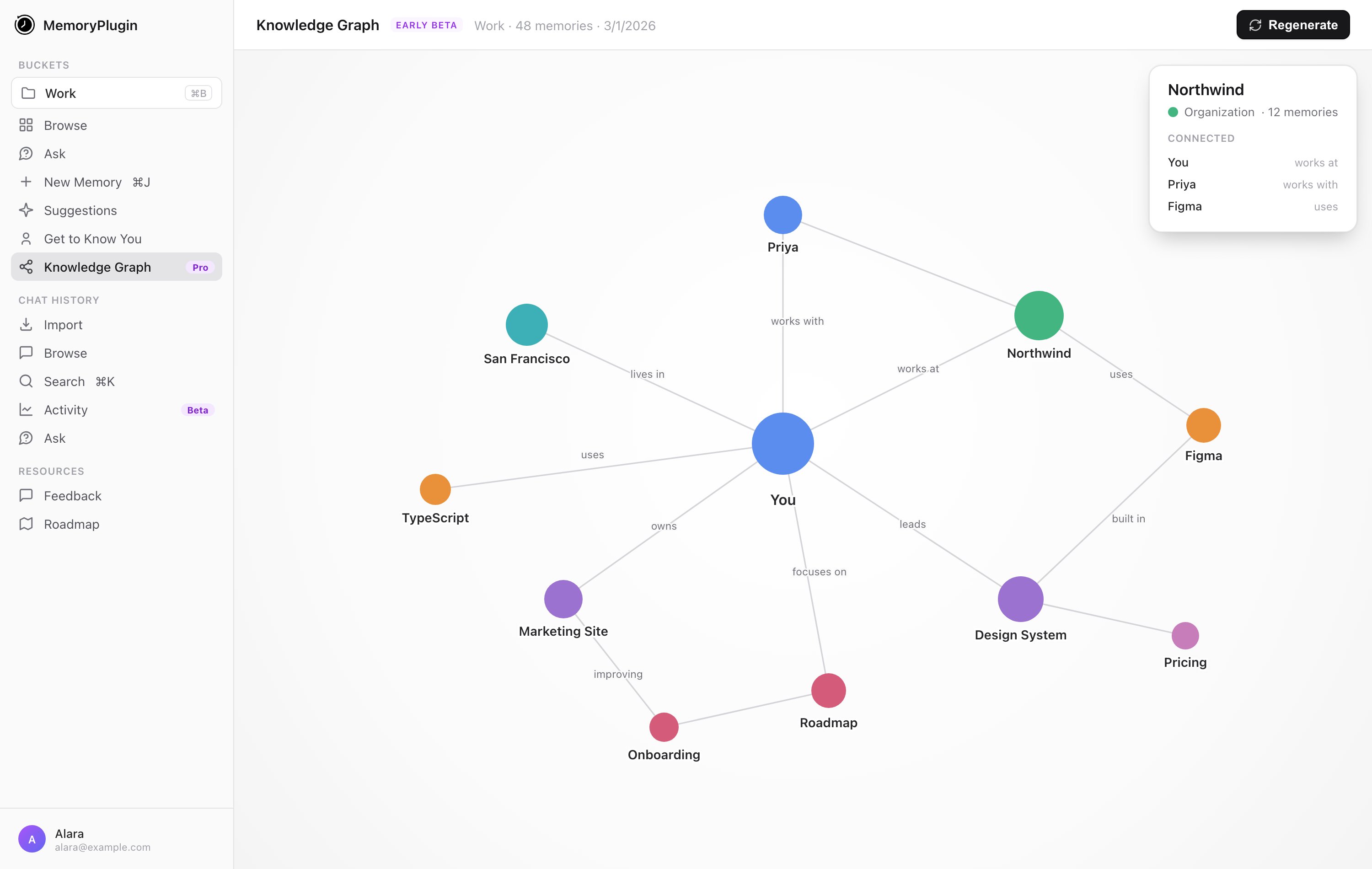
A bucket full of memories is a list. Knowledge Graph turns one bucket into a concept map instead: it reads the memories and shows how the ideas in them connect to each other. It's the pins-and-string view of what you've saved, rather than a scroll.

Knowledge Graph is **Pro plan only**. The sidebar entry is hidden unless you're on Pro (or higher); when it's shown it carries a **Pro** badge.

## Generating a graph

<Steps>
  <Step title="Select a memory bucket">
    Open **Knowledge Graph** from the sidebar and pick a memory bucket. Without one selected, the page prompts you to choose a bucket.
  </Step>

  <Step title="Generate">
    Click **Generate**. A confirmation dialog explains that this analyzes every memory in the bucket and can take up to 30 minutes for large buckets. Confirm to start.
  </Step>

  <Step title="Come back for it">
    Generation runs in the background. You can close the page and return later; the graph shows a processing state while it builds.
  </Step>
</Steps>

<Frame caption="An example of the kind of map it builds: entities connected by typed relationships.">
  <img className="block dark:hidden" src="https://mintcdn.com/memoryplugin/0D7zqA9Ak-TR54pG/images/diagrams/knowledge-graph-example-light.svg?fit=max&auto=format&n=0D7zqA9Ak-TR54pG&q=85&s=ead15014d8cc3b7503eef4d0a530a44d" alt="Example knowledge graph: a user node with typed edges like works at, lives in, uses, owns" width="720" height="300" data-path="images/diagrams/knowledge-graph-example-light.svg" />

  <img className="hidden dark:block" src="https://mintcdn.com/memoryplugin/0D7zqA9Ak-TR54pG/images/diagrams/knowledge-graph-example-dark.svg?fit=max&auto=format&n=0D7zqA9Ak-TR54pG&q=85&s=139a72fd01cbe5b0cd9b5a625ab61e44" alt="Example knowledge graph: a user node with typed edges like works at, lives in, uses, owns" width="720" height="300" data-path="images/diagrams/knowledge-graph-example-dark.svg" />
</Frame>

<Frame caption="A generated knowledge graph: concepts as nodes, typed relationships as labelled edges. Click a node to see how it connects.">
  <img src="https://mintcdn.com/memoryplugin/9o9T_0PzzkacB3w3/images/screenshots/tools/knowledge-graph-page.png?fit=max&auto=format&n=9o9T_0PzzkacB3w3&q=85&s=ad6996bdf3502d816e6a9a268f184c07" alt="Knowledge Graph page showing a concept map with nodes like You, Northwind, and Design System connected by typed edges such as works at, leads, and uses" width="3000" height="1900" data-path="images/screenshots/tools/knowledge-graph-page.png" />
</Frame>

To rebuild after adding memories, use **Regenerate**, which replaces the existing graph with a fresh one.

## Good to know

* **It's per bucket.** Each graph maps a single bucket, not your whole account.
* **It can take a while.** Building a graph uses AI and can take up to 30 minutes for a large bucket. This isn't instant, and that's expected.
* **Memory buckets only.** Point it at a bucket that has memories in it.

## Next steps

<CardGroup cols={2}>
  <Card title="Memory Buckets" icon="folder" href="/features/memory-buckets">
    Organize memories into the buckets a graph is built from
  </Card>

  <Card title="Smart Memory" icon="brain" href="/features/smart-memory">
    Group a bucket into categories for token-efficient recall
  </Card>
</CardGroup>