> ## Documentation Index
> Fetch the complete documentation index at: https://help.memoryplugin.com/llms.txt
> Use this file to discover all available pages before exploring further.

# Memory Suggestions

> AI-suggested cleanups for your memories: remove duplicates, combine related ones, update stale ones

export const ArticleInfo = ({author, lastUpdated}) => {
  const authorAvatar = author === 'Alara' ? '/images/author-alara.jpg' : author === 'asad' ? '/images/author-alara.jpg' : null;
  const formatDate = dateInput => {
    if (!dateInput) return '';
    if (typeof dateInput === 'string' && !dateInput.match(/^\d{4}-\d{2}-\d{2}/)) {
      return dateInput;
    }
    try {
      const date = new Date(dateInput);
      const now = new Date();
      const diffTime = Math.abs(now - date);
      const diffDays = Math.floor(diffTime / (1000 * 60 * 60 * 24));
      if (diffDays === 0) return 'today';
      if (diffDays === 1) return '1 day ago';
      if (diffDays < 7) return `${diffDays} days ago`;
      if (diffDays < 30) return `${Math.ceil(diffDays / 7)} week${Math.ceil(diffDays / 7) > 1 ? 's' : ''} ago`;
      if (diffDays < 365) return `${Math.ceil(diffDays / 30)} month${Math.ceil(diffDays / 30) > 1 ? 's' : ''} ago`;
      return `${Math.ceil(diffDays / 365)} year${Math.ceil(diffDays / 365) > 1 ? 's' : ''} ago`;
    } catch {
      return dateInput;
    }
  };
  return <div style={{
    display: "flex",
    alignItems: "center",
    gap: "8px",
    marginBottom: "16px",
    padding: "8px 12px",
    backgroundColor: "var(--ifm-color-emphasis-100)",
    borderRadius: "6px",
    fontSize: "14px",
    color: "var(--ifm-color-content-secondary)",
    border: "1px solid var(--ifm-color-emphasis-200)",
    opacity: "0.8"
  }}>
      <div style={{
    width: "40px",
    height: "40px",
    borderRadius: "50%",
    background: authorAvatar || "linear-gradient(45deg, #4F46E5, #7C3AED)",
    display: "flex",
    alignItems: "center",
    justifyContent: "center",
    color: "white",
    fontWeight: "bold",
    fontSize: "18px"
  }}>
        {authorAvatar ? <img src={authorAvatar} alt={author} style={{
    width: "100%",
    height: "100%",
    borderRadius: "50%"
  }} /> : author?.[0]?.toUpperCase()}
      </div>
      <div>
        <div style={{
    fontWeight: "400",
    fontSize: "14px"
  }}>Written by <span style={{
    fontWeight: "600"
  }}>{author}</span></div>
        <div style={{
    fontSize: "14px"
  }}>Last updated <span style={{
    fontWeight: "600"
  }}>{formatDate(lastUpdated)}</span></div>
      </div>
    </div>;
};

<ArticleInfo author="Alara" lastUpdated="2026-07-04" />

Add memories for a few months and a bucket gets messy. You save "I use TypeScript" three times in slightly different words. Two memories say almost the same thing and could be one. A fact that used to be true has drifted. Memory Suggestions is the cleanup pass: MemoryPlugin scans a bucket, finds these cases, and proposes fixes for you to approve or reject.

Think of it as a friend helping you clear out a junk drawer, holding up two near-identical things and asking "do you need both of these?" You still decide. Where the analogy breaks: it only looks for a few specific kinds of clutter (duplicates, mergeable pairs, outdated wording), not a full reorganization of the drawer.

Memory Suggestions is available on all paid plans. It is not a Pro-only feature.

## The three kinds of suggestion

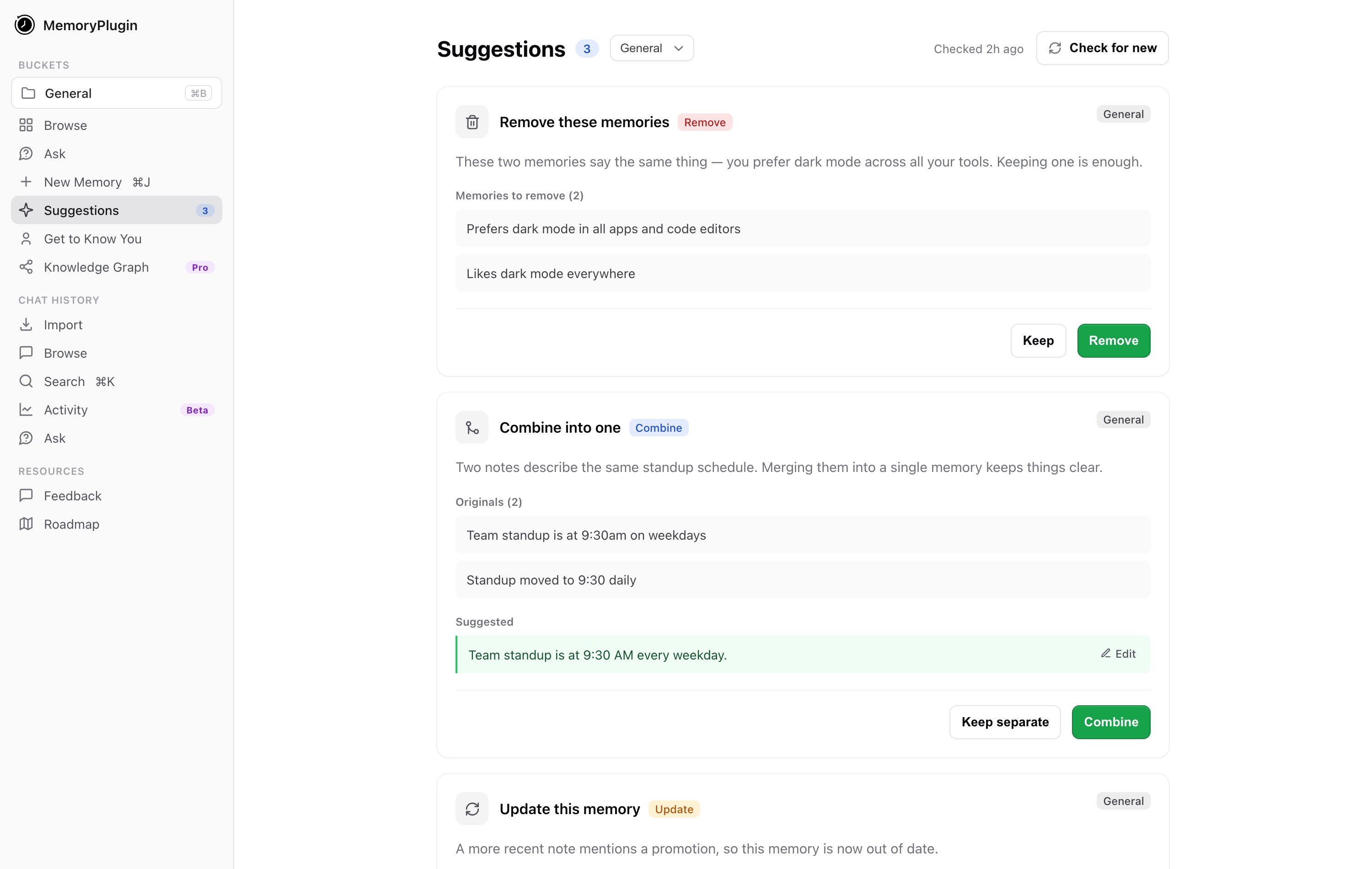
Every suggestion falls into one of three operations, and each card gives you a plain accept-or-reject choice:

<CardGroup cols={3}>
  <Card title="Remove" icon="trash">
    Duplicate or redundant memories it recommends deleting. Accept with **Remove**, reject with **Keep**.
  </Card>

  <Card title="Combine into one" icon="object-group">
    Related memories that read better merged into a single cleaner entry. Accept with **Combine**, reject with **Keep separate**.
  </Card>

  <Card title="Update this memory" icon="pen">
    A memory rewritten to be clearer or more current. Accept with **Save update**, reject with **Keep original**.
  </Card>
</CardGroup>

Accepting shows a short confirmation ("Memory removed", "Memories combined", or "Memory updated"). Rejecting keeps things exactly as they were ("Kept as-is"). Nothing changes without your say-so.

## Running it

<Steps>
  <Step title="Open Suggestions">
    Go to **Suggestions** in the sidebar. It sits under the memory section.
  </Step>

  <Step title="Pick a bucket and find suggestions">
    Choose a bucket and click **Find suggestions**. MemoryPlugin analyzes the bucket ("Looking through your memories..."), which usually takes a minute or two.
  </Step>

  <Step title="Review each card">
    Suggestions appear as cards. Go through them one at a time, accepting or rejecting each.
  </Step>

  <Step title="Check for new later">
    Once you've handled the current batch, use **Check for new** to scan memories not already covered by existing suggestions.
  </Step>
</Steps>

<Frame caption="Nothing is written until you approve it: the AI proposes, you decide.">
  <img className="block dark:hidden" src="https://mintcdn.com/memoryplugin/0D7zqA9Ak-TR54pG/images/diagrams/suggestions-hitl-light.svg?fit=max&auto=format&n=0D7zqA9Ak-TR54pG&q=85&s=773169eff944206ddfc9557a0d195bde" alt="Diagram: an AI curator proposes delete, combine, or update edits; a human approves or rejects before anything is written" width="720" height="236" data-path="images/diagrams/suggestions-hitl-light.svg" />

  <img className="hidden dark:block" src="https://mintcdn.com/memoryplugin/0D7zqA9Ak-TR54pG/images/diagrams/suggestions-hitl-dark.svg?fit=max&auto=format&n=0D7zqA9Ak-TR54pG&q=85&s=e2571e29446473acde87071faec8d014" alt="Diagram: an AI curator proposes delete, combine, or update edits; a human approves or rejects before anything is written" width="720" height="236" data-path="images/diagrams/suggestions-hitl-dark.svg" />
</Frame>

<Frame caption="The Suggestions page with one card of each type: remove a duplicate, combine two, and update an outdated memory.">
  <img className="block dark:hidden" src="https://mintcdn.com/memoryplugin/9o9T_0PzzkacB3w3/images/screenshots/tools/suggestions-page.png?fit=max&auto=format&n=9o9T_0PzzkacB3w3&q=85&s=bc55ecf652a81e8a99391315cae36d23" alt="Suggestions page showing a Remove card, a Combine card, and an Update card, each with accept and reject actions" width="3000" height="1900" data-path="images/screenshots/tools/suggestions-page.png" />

  <img className="hidden dark:block" src="https://mintcdn.com/memoryplugin/9o9T_0PzzkacB3w3/images/screenshots/tools/suggestions-page-dark.png?fit=max&auto=format&n=9o9T_0PzzkacB3w3&q=85&s=71fd5d547b916cfcc4698dedb81b0629" alt="Suggestions page showing a Remove card, a Combine card, and an Update card, each with accept and reject actions" width="3000" height="1900" data-path="images/screenshots/tools/suggestions-page-dark.png" />
</Frame>

## The pending badge in the sidebar

You don't have to remember to visit the page. When the selected bucket has suggestions waiting, the **Suggestions** item in the sidebar shows an **amber count badge**. That number is your pile of pending cleanups. When it's gone, you're caught up.

## What it skips

Memory Suggestions is built for the short, factual memories that make up most of a bucket. It **skips any memory over 10,000 tokens**. Very large memories are unlikely to be duplicates of anything and are expensive to compare, so the analysis leaves them alone rather than burning time on them. Everything under that limit is fair game.

## Next steps

<CardGroup cols={2}>
  <Card title="Smart Memory" icon="brain" href="/features/smart-memory">
    Group a bucket into categories for token-efficient recall
  </Card>

  <Card title="Bulk Operations" icon="layer-group" href="/features/bulk-operations">
    Select, move, and delete memories in batches yourself
  </Card>
</CardGroup>