> ## Documentation Index
> Fetch the complete documentation index at: https://help.memoryplugin.com/llms.txt
> Use this file to discover all available pages before exploring further.

# Shared Buckets

> Share a memory bucket with another person, set what they can do, and see who added what

export const ArticleInfo = ({author, lastUpdated}) => {
  const authorAvatar = author === 'Alara' ? '/images/author-alara.jpg' : author === 'asad' ? '/images/author-alara.jpg' : null;
  const formatDate = dateInput => {
    if (!dateInput) return '';
    if (typeof dateInput === 'string' && !dateInput.match(/^\d{4}-\d{2}-\d{2}/)) {
      return dateInput;
    }
    try {
      const date = new Date(dateInput);
      const now = new Date();
      const diffTime = Math.abs(now - date);
      const diffDays = Math.floor(diffTime / (1000 * 60 * 60 * 24));
      if (diffDays === 0) return 'today';
      if (diffDays === 1) return '1 day ago';
      if (diffDays < 7) return `${diffDays} days ago`;
      if (diffDays < 30) return `${Math.ceil(diffDays / 7)} week${Math.ceil(diffDays / 7) > 1 ? 's' : ''} ago`;
      if (diffDays < 365) return `${Math.ceil(diffDays / 30)} month${Math.ceil(diffDays / 30) > 1 ? 's' : ''} ago`;
      return `${Math.ceil(diffDays / 365)} year${Math.ceil(diffDays / 365) > 1 ? 's' : ''} ago`;
    } catch {
      return dateInput;
    }
  };
  return <div style={{
    display: "flex",
    alignItems: "center",
    gap: "8px",
    marginBottom: "16px",
    padding: "8px 12px",
    backgroundColor: "var(--ifm-color-emphasis-100)",
    borderRadius: "6px",
    fontSize: "14px",
    color: "var(--ifm-color-content-secondary)",
    border: "1px solid var(--ifm-color-emphasis-200)",
    opacity: "0.8"
  }}>
      <div style={{
    width: "40px",
    height: "40px",
    borderRadius: "50%",
    background: authorAvatar || "linear-gradient(45deg, #4F46E5, #7C3AED)",
    display: "flex",
    alignItems: "center",
    justifyContent: "center",
    color: "white",
    fontWeight: "bold",
    fontSize: "18px"
  }}>
        {authorAvatar ? <img src={authorAvatar} alt={author} style={{
    width: "100%",
    height: "100%",
    borderRadius: "50%"
  }} /> : author?.[0]?.toUpperCase()}
      </div>
      <div>
        <div style={{
    fontWeight: "400",
    fontSize: "14px"
  }}>Written by <span style={{
    fontWeight: "600"
  }}>{author}</span></div>
        <div style={{
    fontSize: "14px"
  }}>Last updated <span style={{
    fontWeight: "600"
  }}>{formatDate(lastUpdated)}</span></div>
      </div>
    </div>;
};

<ArticleInfo author="Alara" lastUpdated="2026-07-04" />

You and a teammate keep telling your AIs the same things about the same project: the client's constraints, the decisions you already ruled out, the house style. Two people, two memory collections, the same facts typed twice. Shared buckets fix that. You share one bucket, and everyone with access can use those memories in their own AI, in whichever tool they open.

Think of it like handing someone a key to a drawer. Some people you let look inside, some you let drop things in, some you let rearrange everything. The key decides what they can do. Where the analogy breaks: a real key is all-or-nothing and hard to take back, while bucket access is per-person, split into three levels, and you can change or revoke it at any time.

Sharing a bucket is a **Pro** feature. Anyone you invite can accept on any plan.

## Roles: who can do what

When you invite someone, you pick one of three roles. These map to what they can do with the memories in the bucket.

| Role            | Can read & use | Can add | Can edit or delete       |
| --------------- | -------------- | ------- | ------------------------ |
| **Viewer**      | Yes            | No      | No                       |
| **Contributor** | Yes            | Yes     | Only memories they added |
| **Editor**      | Yes            | Yes     | Anyone's memories        |

A few details worth knowing:

* **Contributor is the default** when you send an invite. It is the "add but don't touch anyone else's" role.
* A **Contributor** can only edit or delete memories they authored themselves. Memories the owner added, or memories with no recorded author, stay out of their reach.
* An **Editor** can rewrite or remove any memory in the bucket, including the owner's.
* Only the **owner** can rename the bucket, delete it, manage who has access, or re-run Smart Memory categorization. Sharing hands out access to the memories, not control of the bucket.

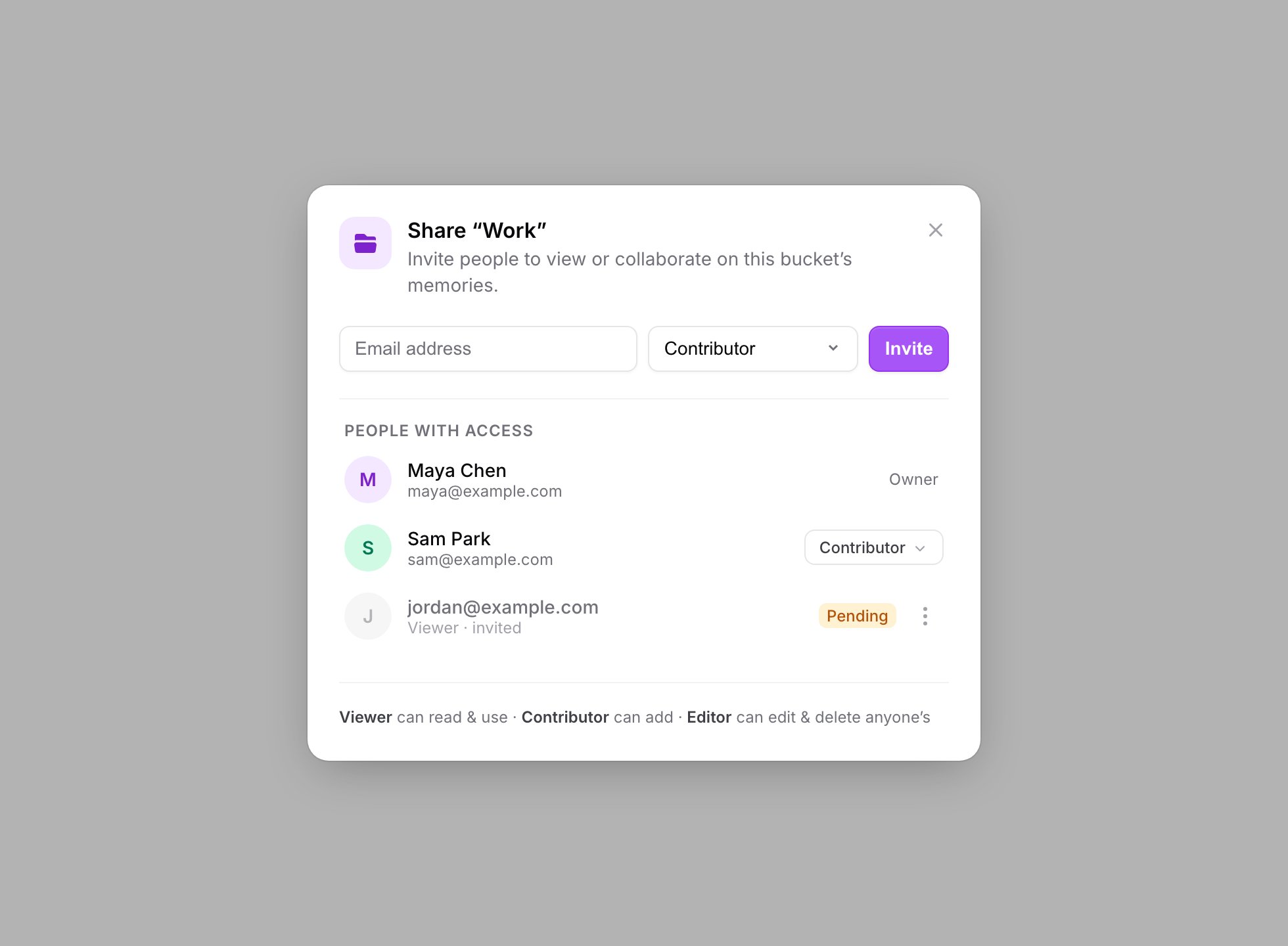
<Frame caption="The Share modal: invite by email, pick a role, and see everyone with access. The footer legend spells out each role: Viewer, Contributor, Editor.">
  <img src="https://mintcdn.com/memoryplugin/9o9T_0PzzkacB3w3/images/screenshots/sharing/share-modal.png?fit=max&auto=format&n=9o9T_0PzzkacB3w3&q=85&s=1a373883fec120dd3aa997fbdc1ef916" alt="Share bucket modal with an email field, a role selector set to Contributor, the People with access list, and a footer legend describing the Viewer, Contributor, and Editor roles" width="1960" height="1440" data-path="images/screenshots/sharing/share-modal.png" />
</Frame>

## Inviting someone

<Steps>
  <Step title="Open the share action">
    In the bucket selector, find the bucket you want to share and choose **Share bucket**. This opens **Share "{bucket}"**.
  </Step>

  <Step title="Enter their email and pick a role">
    Type the person's **email address**, choose Viewer, Contributor, or Editor, and click **Invite**. You will see an **Invite sent** confirmation.
  </Step>

  <Step title="They accept">
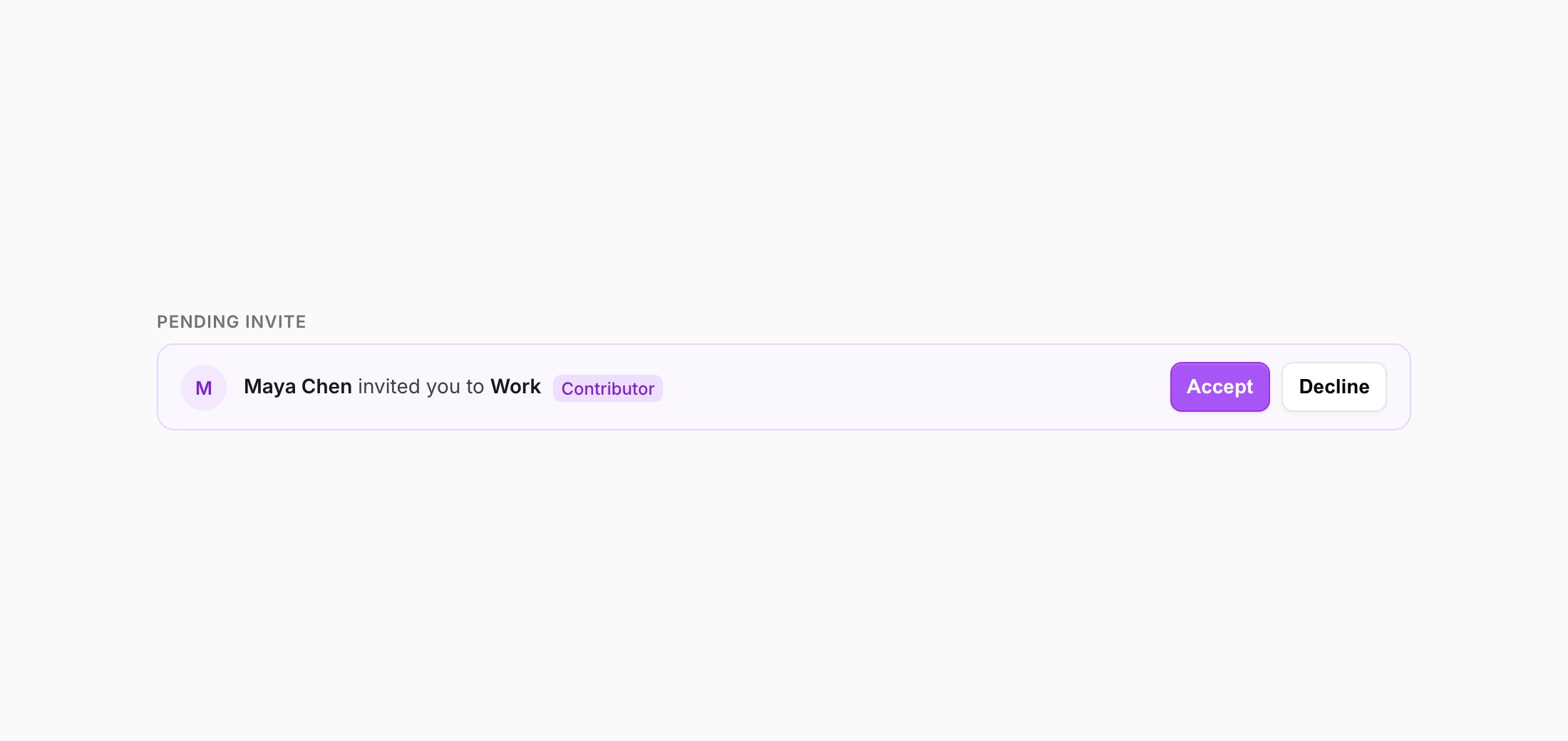
    The invited person sees a **Pending invites** card on their dashboard home: "{Owner} invited you to {bucket}" with the role. They click **Accept** (or **Decline**). On accept, the bucket shows up under **Shared with me** in their bucket selector.
  </Step>
</Steps>

<Frame caption="The invitee sees a Pending invite card on their dashboard home, with Accept and Decline.">
  <img src="https://mintcdn.com/memoryplugin/9o9T_0PzzkacB3w3/images/screenshots/sharing/pending-invite.png?fit=max&auto=format&n=9o9T_0PzzkacB3w3&q=85&s=18b44f52766770ef423aaf48d95b50fd" alt="Pending invite card reading 'Maya Chen invited you to Work' with a Contributor badge and Accept / Decline buttons" width="2200" height="1040" data-path="images/screenshots/sharing/pending-invite.png" />
</Frame>

<video controls playsInline className="w-full aspect-video rounded-xl" src="https://mintcdn.com/memoryplugin/9o9T_0PzzkacB3w3/videos/share-a-bucket.mp4?fit=max&auto=format&n=9o9T_0PzzkacB3w3&q=85&s=f84ad455bd61db710746769eb5c98bdc" data-path="videos/share-a-bucket.mp4" />

In the **People with access** section of the share modal, the owner sees every member with a role dropdown and a **Remove** option, plus pending invites you can **Resend invite** or **Revoke**. Changing a role or removing someone takes effect right away.

## What the General bucket can't do

The default **General** bucket is not shareable. If you try, MemoryPlugin tells you plainly: "The General bucket can't be shared." General is the catch-all every account starts with, so it stays private to you. To share memories, put them in a bucket you created. See [Memory Buckets](/features/memory-buckets) for how buckets work.

Two other limits, so you are not surprised:

* **Only memory buckets can be shared.** File buckets are not shareable.
* **Image memories aren't supported in shared buckets yet.** You can add text memories, but the image upload option is turned off inside a shared bucket. See [Image Memories](/features/image-memories).

## Attribution: who added what

Once more than one person is adding to a bucket, it helps to know where a memory came from. In a shared bucket each memory shows who added it:

* **added by You** for your own
* **added by {owner}** for the owner's
* **added by a collaborator** for anyone else's

This is also what the permission rules run on. A Contributor can edit their own "added by You" memories but not the ones marked as someone else's.

## Moving a memory into a shared bucket

Moving a memory into a bucket that is shared with you is a bigger deal than moving it between your own private buckets, because it becomes visible to everyone with access. So MemoryPlugin asks first. When you move a memory into a shared bucket, a **Move to a shared bucket?** dialog appears: ""{bucket}" is shared with you by {owner}. Moving this memory here makes it visible to everyone with access to this bucket." Confirm with **Move here**, or **Cancel**.
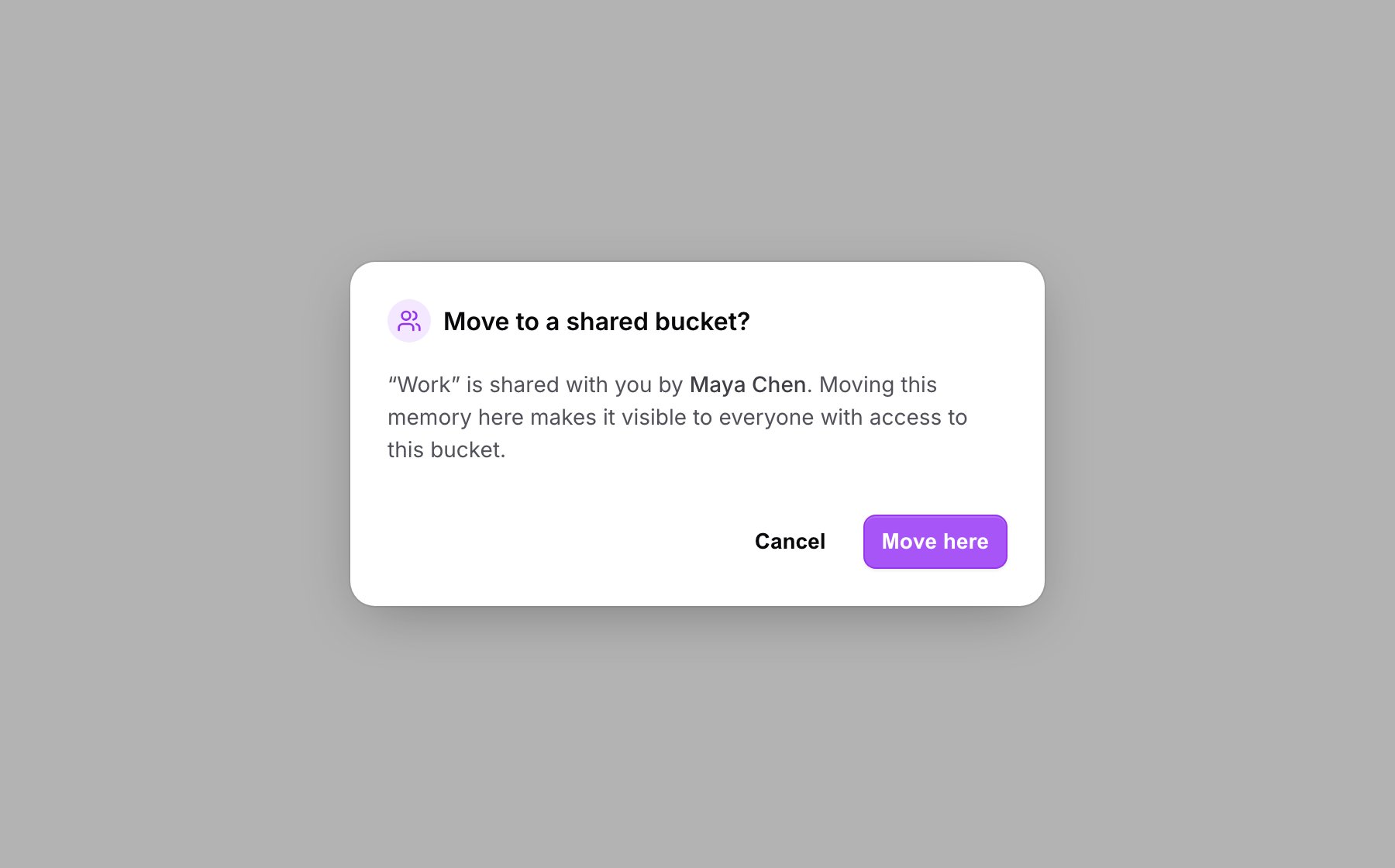
<Frame caption="Moving a memory into a shared bucket asks for confirmation first, since it becomes visible to everyone with access.">
  <img src="https://mintcdn.com/memoryplugin/9o9T_0PzzkacB3w3/images/screenshots/sharing/move-to-shared-confirm.png?fit=max&auto=format&n=9o9T_0PzzkacB3w3&q=85&s=ff37caafecf9919e28eeff279e310e83" alt="Move to a shared bucket confirmation dialog explaining that the memory will be visible to everyone with access, with Cancel and Move here buttons" width="1800" height="1120" data-path="images/screenshots/sharing/move-to-shared-confirm.png" />
</Frame>

## If you are a Viewer

A Viewer sees a banner at the top of the bucket: "**View-only.** You can use these memories in your AI, but can't add, edit, or delete here." You can still recall those memories in your own AI everywhere MemoryPlugin works. You just can't change the shared collection. If you need to contribute, ask the owner for a higher role.

## Next steps

<CardGroup cols={2}>
  <Card title="Memory Buckets" icon="folder" href="/features/memory-buckets">
    Create the buckets you want to share and organize memories into them
  </Card>

  <Card title="Bulk Operations" icon="layer-group" href="/features/bulk-operations">
    Select and move memories between buckets, including shared ones
  </Card>
</CardGroup>