> ## Documentation Index
> Fetch the complete documentation index at: https://help.memoryplugin.com/llms.txt
> Use this file to discover all available pages before exploring further.

# Perplexity

> Use MemoryPlugin with Perplexity

export const ArticleInfo = ({author, lastUpdated}) => {
  const authorAvatar = author === 'Alara' ? '/images/author-alara.jpg' : author === 'asad' ? '/images/author-alara.jpg' : null;
  const formatDate = dateInput => {
    if (!dateInput) return '';
    if (typeof dateInput === 'string' && !dateInput.match(/^\d{4}-\d{2}-\d{2}/)) {
      return dateInput;
    }
    try {
      const date = new Date(dateInput);
      const now = new Date();
      const diffTime = Math.abs(now - date);
      const diffDays = Math.floor(diffTime / (1000 * 60 * 60 * 24));
      if (diffDays === 0) return 'today';
      if (diffDays === 1) return '1 day ago';
      if (diffDays < 7) return `${diffDays} days ago`;
      if (diffDays < 30) return `${Math.ceil(diffDays / 7)} week${Math.ceil(diffDays / 7) > 1 ? 's' : ''} ago`;
      if (diffDays < 365) return `${Math.ceil(diffDays / 30)} month${Math.ceil(diffDays / 30) > 1 ? 's' : ''} ago`;
      return `${Math.ceil(diffDays / 365)} year${Math.ceil(diffDays / 365) > 1 ? 's' : ''} ago`;
    } catch {
      return dateInput;
    }
  };
  return <div style={{
    display: "flex",
    alignItems: "center",
    gap: "8px",
    marginBottom: "16px",
    padding: "8px 12px",
    backgroundColor: "var(--ifm-color-emphasis-100)",
    borderRadius: "6px",
    fontSize: "14px",
    color: "var(--ifm-color-content-secondary)",
    border: "1px solid var(--ifm-color-emphasis-200)",
    opacity: "0.8"
  }}>
      <div style={{
    width: "40px",
    height: "40px",
    borderRadius: "50%",
    background: authorAvatar || "linear-gradient(45deg, #4F46E5, #7C3AED)",
    display: "flex",
    alignItems: "center",
    justifyContent: "center",
    color: "white",
    fontWeight: "bold",
    fontSize: "18px"
  }}>
        {authorAvatar ? <img src={authorAvatar} alt={author} style={{
    width: "100%",
    height: "100%",
    borderRadius: "50%"
  }} /> : author?.[0]?.toUpperCase()}
      </div>
      <div>
        <div style={{
    fontWeight: "400",
    fontSize: "14px"
  }}>Written by <span style={{
    fontWeight: "600"
  }}>{author}</span></div>
        <div style={{
    fontSize: "14px"
  }}>Last updated <span style={{
    fontWeight: "600"
  }}>{formatDate(lastUpdated)}</span></div>
      </div>
    </div>;
};

<ArticleInfo author="Alara" lastUpdated="2026-07-04" />

<img src="https://mintcdn.com/memoryplugin/0D7zqA9Ak-TR54pG/images/logos/perplexity.svg?fit=max&auto=format&n=0D7zqA9Ak-TR54pG&q=85&s=35c29ad09cd3e3e897643469da14947b" alt="Perplexity" width="56" height="56" noZoom style={{ background: "#fff", borderRadius: "14px", padding: "10px", boxShadow: "0 1px 2px rgba(0,0,0,0.12)", boxSizing: "border-box" }} data-path="images/logos/perplexity.svg" />

Perplexity is an AI answer engine that grounds its replies in live web search, at [perplexity.ai](https://perplexity.ai). MemoryPlugin adds long-term memory that carries across your other AI tools, through the browser extension.

## Set up
<Steps>
  <Step title="Install the extension">
    Install the [browser extension](/integrations/browser-extension) and sign in to your MemoryPlugin account.
  </Step>

  <Step title="Open Perplexity">
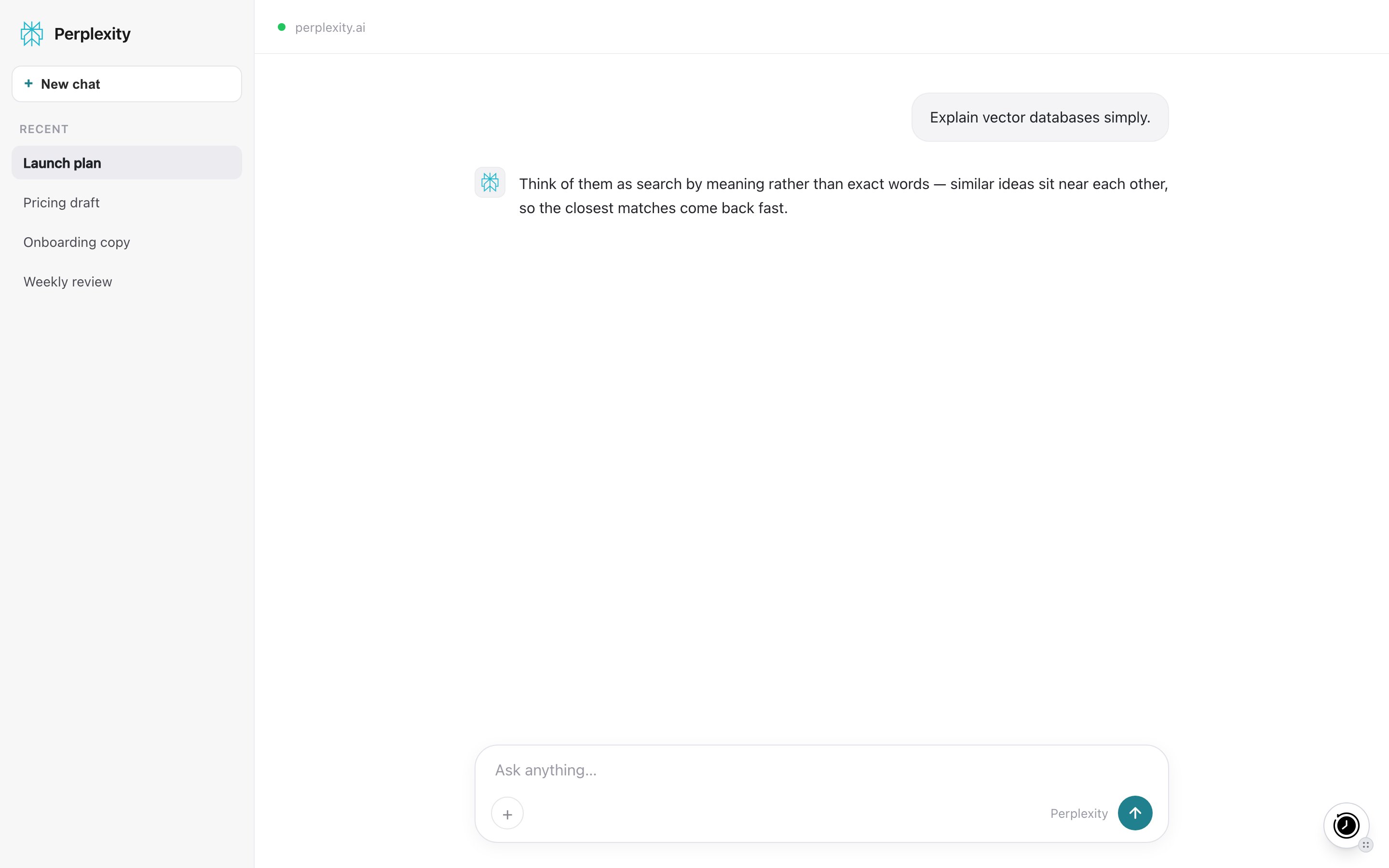
    Go to [perplexity.ai](https://perplexity.ai). A floating MemoryPlugin button appears on the page.
  </Step>

  <Step title="Activate for the chat">
    Click the button to inject memories from your selected bucket into the ask box, then send your question. This also tells Perplexity how to save new memories as you research.
  </Step>
</Steps>

<Frame caption="The MemoryPlugin floating button on perplexity.ai. Click it to inject memories or open the panel.">
  <img src="https://mintcdn.com/memoryplugin/9o9T_0PzzkacB3w3/images/screenshots/platforms/perplexity.png?fit=max&auto=format&n=9o9T_0PzzkacB3w3&q=85&s=ae217d1c3fe3e69947b3da9c795741a4" alt="MemoryPlugin floating button on Perplexity (perplexity.ai)" width="2880" height="1800" data-path="images/screenshots/platforms/perplexity.png" />
</Frame>

## What works here

* **Memory recall and save.** Injected memories ride along with your question, so Perplexity keeps your context while it searches the web. New memories are saved back as you go.
* **Extract memory pill.** Select text in a chat and click **Extract memory** to save that snippet.

## Limitations

* No chat history sync here. The extension captures new conversations only on ChatGPT, Claude, Gemini, Grok, DeepSeek, and TypingMind. You can still recall chat history imported from those tools while researching in Perplexity.

## Next steps

<CardGroup cols={2}>
  <Card title="Browser Extension" icon="browser" href="/integrations/browser-extension">
    Full setup and features
  </Card>

  <Card title="Support" icon="envelope" href="mailto:support@memoryplugin.com">
    Questions about this integration
  </Card>
</CardGroup>
